
75% of consumers recognize a brand by its logo alone. So, a logo is more than just a design. It represents your business identity. It’s the first impression people remember.
That’s why a logo should always look professional. To ensure that, you have to know about the vectorized logo.
What is a vector logo? It’s a specific form of graphic made by using paths. Regular images that we capture with our smartphones are pixel-based images.
Those pixel-based images have some quality limitations. Vector logo is the preferred format.
What is a Vector Logo?
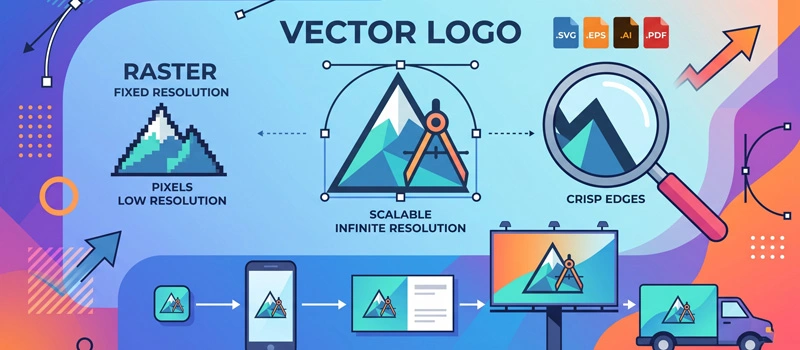
A vector logo is created using mathematical paths, lines, curves, and shapes. It’s not created by using small pixels. Vector logo files can be resized to any size without losing quality.
You can use it for printing, advertising, billboards, banners, and any other brand material.
The Vector logo is used for social media icons, product packaging, t-shirts, vehicle wraps, banners, and large signs. It will still look clear.
Vector files use geometric shapes. The design remains smooth in every platform. A vector-based logo rebuilds itself perfectly at every size.
Why Do Businesses Need Vector Logos?
Businesses need logos that don’t lose resolution. A vector logo has the quality needed for professional branding. It remains perfect for any size.
The biggest advantage of a vector logo is unlimited resizing options. You can resize it without damaging the image quality.
There is no blurriness, distortion, and pixelation. You will get a professional appearance. Smooth curves make your logo look trustworthy.
Customers judge a business based on visual presentation. Low-quality graphics make them look unprofessional. A vector logo helps to maintain a strong visual identity.
Why do printing people ask for vector logos?
If you send your logo for printing, printing people will ask for it in vector format. Need to change colors?
A logo needs frequent changes. Sometimes you have to update text or remove some part of the design. Editing is simple in vector files. Every element stays separate.
Designers can quickly adjust the logo without rebuilding it. It is suitable for printers. Also, you can use it on any digital platform.
A vector logo is needed for websites, mobile apps, packaging, embroidery, stickers, and marketing materials. You only need one master file for everything.
Why Vector Logo and Raster Logo Are Different?
Many people confuse vector files with regular image files. They work very differently. A raster logo is made from small colored squares. Those squares are called pixels.
You can see those pixels after zooming on the image. Pixel-based images cause blurry edges. A vector logo does not rely on pixels. It uses paths and curves that don’t get blurry.
Raster files create issues such as blurry printing, pixelated edges, difficult editing, and limited flexibility. This becomes a serious problem if businesses try to use low-resolution logos for professional printing. You can solve all those issues by using a vector logo.
How To Know The Logo Is Not Vector Format?
Do you know your logo is vector or raster? You can detect it easily by following a method. First of all, you have to look at the file format PNG, and JPG is the file format of raster images.
AI is the proper editable vector format of a logo. Secondly, you also need to zoom in on the logo. If the quality stays consistent, it is a vector logo. Otherwise, the logo is a raster.
Low-resolution logos look blurry on banners, shirts, and flyers. Also, if you open the logo in Illustrator, every part of the logo won’t be separate. Those are not proper vector formats.
Raster files are harder to modify. Individual elements are located together. Those are some easy signs to know if your logo is vector or not.
Where Can You Use a Vector Logo?
A vector logo gives you complete freedom. You can use it for all branding materials. Your logo stays sharp in every small print area.
Vector files are essential for screen printing and embroidery work. Your logo displays clearly on mobile devices, desktops, and tablets.
At the same time, large-format printing requires vector quality to avoid blurry results. So, you can use one vector logo on any professional platform. If you need to change the logo color, you can do that easily in Illustrator. The file is fully editable.
How a Vector Logo Helps Your Business?
A professional logo creates consistency in every customer engagement. That consistency builds trust. Your branding looks polished.
People naturally see your business as more reliable. A consistent logo becomes easier for customers to remember. It helps with better marketing materials.
Flyers, ads, packaging, and promotional items all look professional with a vector logo. You can avoid the extra cost of redesigns. Your logo will be prepared for every format. So, you will get some added advantage in every step.
Can You Convert an Existing Logo into Vector Format?
You can convert an old low-quality logo into a vector file through our service. The process is called logo vectorization. The quality of the logo will always be high.
It depends on how the conversion is done. Our super-skilled vector artists are highly skilled in that. Online tools use auto-tracing software to generate vector files.
We never do that. Our entire service is done manually by hand-drawn method. You just need to send us your existing logo. You can also send us the scanned version. We can recreate vector logos from any poor-quality files. The file just needs to be visible.
Sum Up
Still confused about what is a vector logo? Hopefully, all of your confusion is gone now. If you have any further questions, you can contact our support team.
We are ready to discuss your vector project. Vector graphics make a logo perfect. If your current logo becomes blurry, you have low-quality image files.
It’s the perfect time to upgrade to a professional vector logo. A clean vector file gives you the freedom to grow with confidence. Let’s have a try.
FAQ’s
How do I know if my logo is vector?
Zoom in on your logo. If the quality is the same after zooming in, it is the vector format. If you see small pixels, the logo is in raster format.
Is vector better than PNG?
The vector file has more editing flexibility compared to PNG. Also, you will get high resolution in vector files. So, it is better than PNG for printing and brand visuals.
How do I make my logo a vector?
You have to use a vector-based application to make your logo vector. Adobe Illustrator is the standard application for that. You need to create the logo using shapes and paths.
What is a vector icon?
A vector icon is an icon made using vector graphics. Those icons are mainly used for printing materials. Graphic designers also use vector icons.